> ## Documentation Index
> Fetch the complete documentation index at: https://help.smile.io/llms.txt
> Use this file to discover all available pages before exploring further.
# Update order settings - Shopify
> Configure how points are awarded for orders, including eligible order statuses, taxes, shipping, discounts, and POS purchases.
Order settings determine when customers earn points, including which order statuses qualify and whether taxes, shipping, discount codes, and POS purchases are included when calculating points.
**Note:** These settings are only available for merchants using Shopify or Shopify Plus. If you're looking for BigCommerce order settings, see [Update order settings - BigCommerce](/en/articles/5467063-update-order-settings-bigcommerce).
## Update your order settings
1. In Smile Admin, navigate to **Settings > [Platform](https://app.smile.io/settings/platform) > Order Settings**.
2. Click **Edit**.
 ## Order statuses that earn points
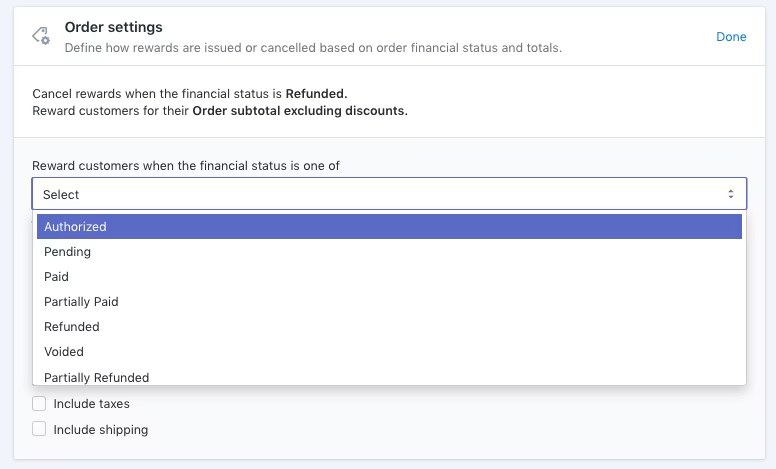
Choose which order statuses customers can earn points for. Available statuses include:
* Authorized
* Pending
* Paid *(recommended)*
* Partially Paid
* Refunded
* Voided
* Partially Refunded
Use the dropdown menu to select the statuses you want to award points for. You can select more than one status.
If you're running a VIP program, consider rewarding customers for **Paid**, **Partially Paid**, and **Partially Refunded** order statuses. If customers do not earn points for these statuses, orders with these statuses will not count toward their VIP tier placement.
**Note:** Shopify orders with an **Archived** or **Cancelled** status are not automatically sent to Smile. To send these orders to Smile, update the order notes (the content does not matter). This prompts Shopify to send a webhook for the order, allowing Smile to ingest it.
## Order statuses that remove points
You can remove points from a customer's account based on the status of their order. Available statuses include:
* Authorized
* Pending
* Paid
* Partially Paid *(recommended)*
* Refunded *(recommended)*
* Voided
* Partially Refunded
By default, rewards are cancelled when an order is refunded. Use the dropdown menu to select one or more statuses that should remove points from a customer's account.
To learn more, see [cancelling rewards and partial refunds](/en/articles/4036183-configure-points-cancellation-for-refunds).
## Rewarding POS orders
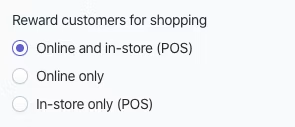
Choose whether customers can earn points for:
* Online and in-store purchases
* Online purchases only
* In-store purchases only
## Order statuses that earn points
Choose which order statuses customers can earn points for. Available statuses include:
* Authorized
* Pending
* Paid *(recommended)*
* Partially Paid
* Refunded
* Voided
* Partially Refunded
Use the dropdown menu to select the statuses you want to award points for. You can select more than one status.
If you're running a VIP program, consider rewarding customers for **Paid**, **Partially Paid**, and **Partially Refunded** order statuses. If customers do not earn points for these statuses, orders with these statuses will not count toward their VIP tier placement.
**Note:** Shopify orders with an **Archived** or **Cancelled** status are not automatically sent to Smile. To send these orders to Smile, update the order notes (the content does not matter). This prompts Shopify to send a webhook for the order, allowing Smile to ingest it.
## Order statuses that remove points
You can remove points from a customer's account based on the status of their order. Available statuses include:
* Authorized
* Pending
* Paid
* Partially Paid *(recommended)*
* Refunded *(recommended)*
* Voided
* Partially Refunded
By default, rewards are cancelled when an order is refunded. Use the dropdown menu to select one or more statuses that should remove points from a customer's account.
To learn more, see [cancelling rewards and partial refunds](/en/articles/4036183-configure-points-cancellation-for-refunds).
## Rewarding POS orders
Choose whether customers can earn points for:
* Online and in-store purchases
* Online purchases only
* In-store purchases only
 ## Rewarding taxes and shipping
You can choose whether taxes and shipping are included in the rewardable order total.
Select the appropriate option to include taxes and/or shipping when calculating points earned on an order.
## Excluding discount codes from earning points
If you don't want customers to earn points on the portion of an order covered by a discount code, enable **Exclude coupon discounts used**.
## Rewarding taxes and shipping
You can choose whether taxes and shipping are included in the rewardable order total.
Select the appropriate option to include taxes and/or shipping when calculating points earned on an order.
## Excluding discount codes from earning points
If you don't want customers to earn points on the portion of an order covered by a discount code, enable **Exclude coupon discounts used**.
 When this setting is enabled, a customer who redeems a \$10 discount code on a \$100 purchase will only earn points on the remaining \$90.
**Note:** This setting only applies to discount codes. Shopify treats gift cards and store credits as payment methods, not discounts. Because of this, they are never excluded from the rewardable order total, regardless of this setting.
When this setting is enabled, a customer who redeems a \$10 discount code on a \$100 purchase will only earn points on the remaining \$90.
**Note:** This setting only applies to discount codes. Shopify treats gift cards and store credits as payment methods, not discounts. Because of this, they are never excluded from the rewardable order total, regardless of this setting.