> ## Documentation Index
> Fetch the complete documentation index at: https://help.smile.io/llms.txt
> Use this file to discover all available pages before exploring further.
# Cancel referral
> How to cancel a fraudulent referral
There may be instances where you want to cancel a referral that has occurred in your referral program. This article will explain how you can cancel a referral to prevent abuse of the referral program.
## What happens when you cancel a referral
If you detect that a referral may be fraudulent, you can cancel it in the [Referrals section](https://app.smile.io/reward-programs/referrals/activity) (Smile Admin > Programs > Activity > Referrals)
## Cancelling a pending referral
A referral is marked **pending** when an Advocate's Friend has entered their email to claim their referral reward code, but has not yet placed an order with their code.
Cancelling a referral in the **pending** state will:
* Prevent the Advocate from receiving a referral code if the Friend places an order.
* Mark the reward code that has been issued to the Friend as cancelled in the customer Panel. They will not be able to copy this code from the Panel.
* For Shopify merchants, Shopify discount codes generated by Smile for the Friend will be voided so they can no longer be used.
## Cancelling a completed referral
A referral is marked **completed** when an Advocate's Friend has entered their email to claim their referral code and the Friend has placed an order.
Cancelling a referral in the **completed** state will:
* Cancel the Advocate and Friend's reward code.
* Adjust the points balance for the Friend and Advocate if they earned points for the referral.
* For Shopify merchants, reward codes generated by Smile for the Advocate and Friend will be voided
## How to cancel a referral
Navigate to the customer who's referral you would like to cancel, and select **Cancel Referral:**
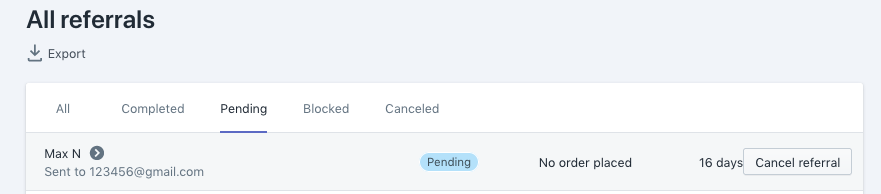
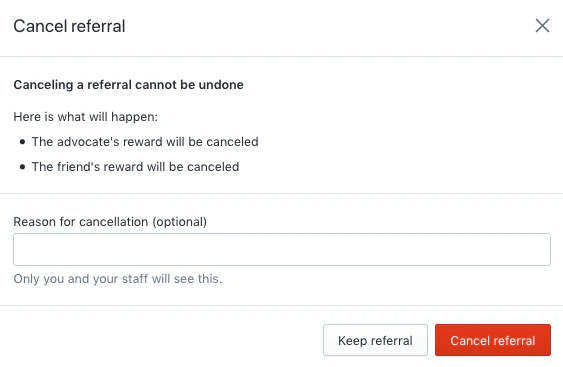 Once you've cancelled a referral it will be moved to the **cancelled** referrals column in your **All Referrals** grid.
**Tip:** A referral cancellation cannot be undone, so make sure you've selected the right referral before you cancel.
There are three instances where a referral will automatically be cancelled by Smile:
* If you remove a customer from your program, any of their pending referrals will be cancelled.
* If a customer is deleted, any of their pending referrals will be cancelled.
* If an order is refunded, any referrals associated with that order will be cancelled.
**Note**: Order cancellations (without a refund) do not automatically cancel the associated referral. You'll need to cancel it manually if needed.
Once you've cancelled a referral it will be moved to the **cancelled** referrals column in your **All Referrals** grid.
**Tip:** A referral cancellation cannot be undone, so make sure you've selected the right referral before you cancel.
There are three instances where a referral will automatically be cancelled by Smile:
* If you remove a customer from your program, any of their pending referrals will be cancelled.
* If a customer is deleted, any of their pending referrals will be cancelled.
* If an order is refunded, any referrals associated with that order will be cancelled.
**Note**: Order cancellations (without a refund) do not automatically cancel the associated referral. You'll need to cancel it manually if needed.