> ## Documentation Index
> Fetch the complete documentation index at: https://help.smile.io/llms.txt
> Use this file to discover all available pages before exploring further.
# Create a loyalty landing page
> Embed an SEO-friendly loyalty landing page directly into your storefront. No code required.
A loyalty landing page is a dedicated page on your website where you can highlight and share information about your loyalty program. It gives customers a clear overview of how your program works, including how they can earn points and redeem rewards.
You can customize the page to match your store's branding and create a cohesive experience for your customers.
**Feature availability**: Loyalty landing page is available on **Essential**, **Standard**, **Growth, Plus, and Enterprise** plans for merchants on **Shopify only.**
## Create the landing page in Smile
1. From Smile Admin navigate to [**On-site content**](https://app.smile.io/on-site).
2. In the **Landing page** section, click **Setup**.
3. In the **Get your loyalty landing page** section, click **Generate page**.
4. In the **Page details** fill out **Title**, **SEO page title**, **SEO page description**, **Page handle** sections.
5. Click **Generate page**.
**Important:** Smile is only used to generate the initial loyalty landing page and template. After the page is created, all future updates are managed in Shopify. After the page has been created, you will be redirected to the Shopify theme editor.
## Manage the landing page in Shopify
1. From Shopify Admin navigate to **Online Store** > **Themes.**
2. In your current theme section click **Customize.**
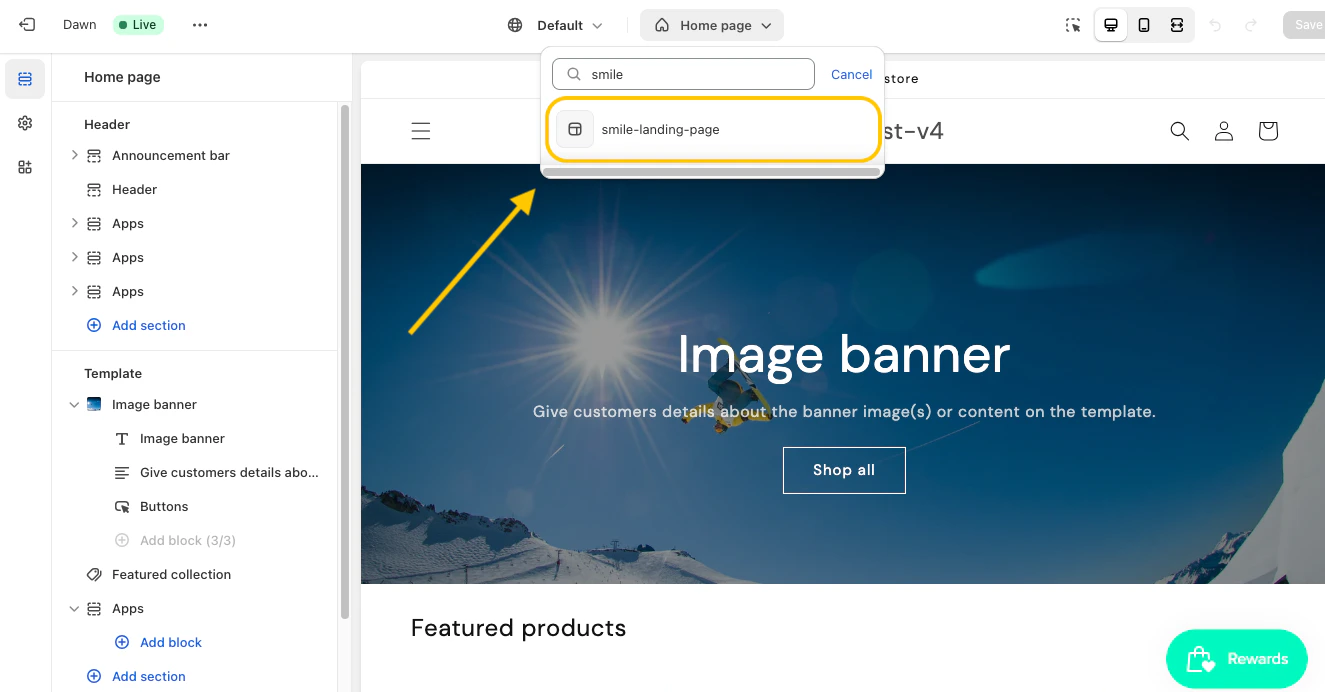
3. In the template selector drop down option choose **smile-landing-page.**
 ## Add page content in Shopify
1. From the **smile-landing-page** in the Template section navigate to **Add section > Apps.**
2. Choose the Smile sections you would like to add to your page:
1. **Header**
2. **How it works**
3. **Earning highlight**
4. **Redeeming highlight**
3. Click **Save.**
**Tip:** Extend your page layout by mixing Smile's page sections with those built into your theme
## Edit page content in Shopify
1. In the **Template** section, click the Smile section you want to edit.
2. Update the available settings. Depending on the section, you can edit options such as colors, images, text, and button labels.
3. Click **Save.**
## Change SEO details
1. From Shopify Admin navigate to **Online Store** > **Pages** > your landing page.
2. In the **Search engine listing** section, click the pencil icon.
3. Change the values accordingly.
4. Click **Save.**
## Add page to the store navigation
1. From Shopify Admin navigate to **Content** > **Menus.**
2. Choose the menu you would like to add the landing page to.
3. Click **Add menu item.**
4. Fill out the **Label** section for how you would like your loyalty page name to appear in the menu.
5. Click into the **Link** box to pull up a menu.
6. Choose **Pages** > name of your loyalty landing page.
## Hide the loyalty landing page
1. From Shopify Admin navigate to Online Store > Pages > your landing page name.
2. In the **Visibility** section, choose **Hidden.**
3. Click **Save.**
## Delete the loyalty landing page
1. From Shopify Admin navigate to Online Store > Pages > your landing page name.
2. Click **Delete page**.
3. On the confirmation page, click **Delete**.
## Add page content in Shopify
1. From the **smile-landing-page** in the Template section navigate to **Add section > Apps.**
2. Choose the Smile sections you would like to add to your page:
1. **Header**
2. **How it works**
3. **Earning highlight**
4. **Redeeming highlight**
3. Click **Save.**
**Tip:** Extend your page layout by mixing Smile's page sections with those built into your theme
## Edit page content in Shopify
1. In the **Template** section, click the Smile section you want to edit.
2. Update the available settings. Depending on the section, you can edit options such as colors, images, text, and button labels.
3. Click **Save.**
## Change SEO details
1. From Shopify Admin navigate to **Online Store** > **Pages** > your landing page.
2. In the **Search engine listing** section, click the pencil icon.
3. Change the values accordingly.
4. Click **Save.**
## Add page to the store navigation
1. From Shopify Admin navigate to **Content** > **Menus.**
2. Choose the menu you would like to add the landing page to.
3. Click **Add menu item.**
4. Fill out the **Label** section for how you would like your loyalty page name to appear in the menu.
5. Click into the **Link** box to pull up a menu.
6. Choose **Pages** > name of your loyalty landing page.
## Hide the loyalty landing page
1. From Shopify Admin navigate to Online Store > Pages > your landing page name.
2. In the **Visibility** section, choose **Hidden.**
3. Click **Save.**
## Delete the loyalty landing page
1. From Shopify Admin navigate to Online Store > Pages > your landing page name.
2. Click **Delete page**.
3. On the confirmation page, click **Delete**.