> ## Documentation Index
> Fetch the complete documentation index at: https://help.smile.io/llms.txt
> Use this file to discover all available pages before exploring further.
# Embed points balance on the customer account page
> Show customers their points balance directly on their account page.
Display your customers' points balance in their account area so they can easily track and redeem their rewards—no code required.
**Feature availability**: Embed points balance on the customer account page is available on **Growth, Plus, and Enterprise** plans for merchants on **Shopify**.
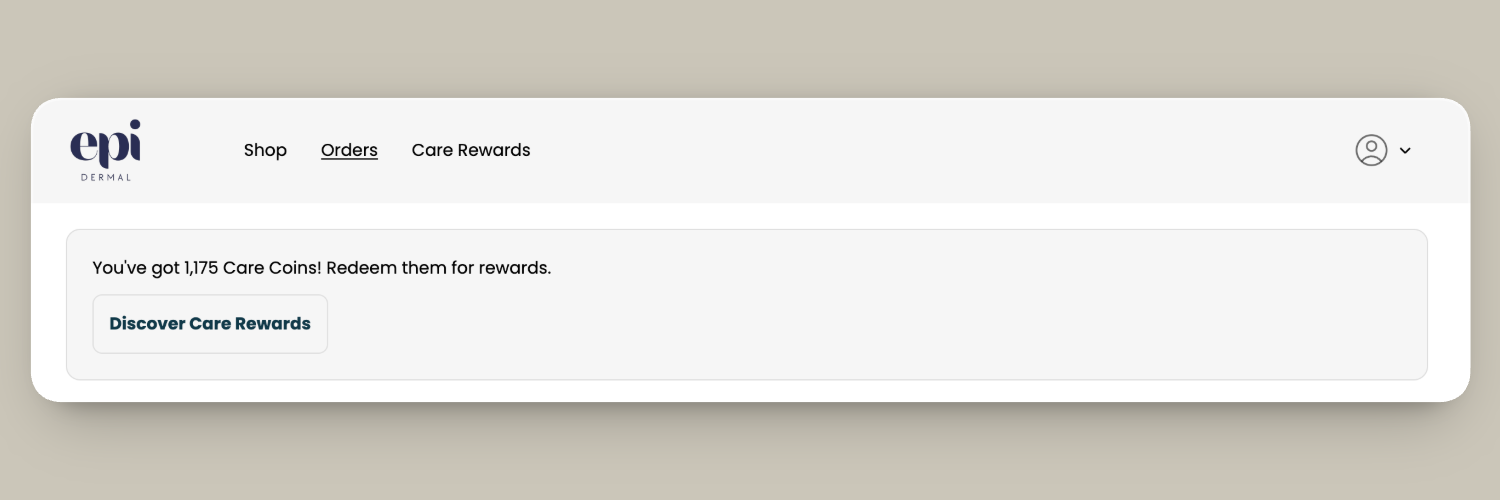 ## How it works
* Displays the customer’s current points balance along with a call-to-action button.
* The button automatically directs customers to redeem rewards when they have enough points, or to ways to earn more points when they do not.
* By default, the button links to the Rewards panel. Loyalty Hub users can update the destination using the **Custom button link** setting.
* You can customize the button text using the **Custom button label** setting. If you leave the default button text unchanged, it is automatically translated based on the customer’s language.
* Displays your custom points currency name, if set.
* Supports both Shopify customer accounts and Shopify legacy customer accounts. Follow the setup steps for your store’s account type below.
## Add points balance to Shopify customer accounts
1. In Smile Admin, navigate to **On-site content** > [**Customer account points banner**](https://admin.shopify.com/apps/smile-io/on-site/accounts/).
2. Click **Go to account editor.**
3. In the left sidebar, find **Loyalty points balance.**
4. Click to add to the **Orders** page.
5. Click **Save.**
## Add points balance to Shopify legacy customer accounts
1. In Smile Admin, navigate to **On-site content** > **[Customer account points banner](https://admin.shopify.com/apps/smile-io/on-site/accounts/).**
2. Click **Go to Themes.**
3. In Shopify Admin, find your active theme and click **Edit theme.**
4. From the drop-down menu in the header, click **Legacy customer accounts** > **Customer account**.
5. Sign in to view the logged in customer state.
6. In the left sidebar, select **Template** > **Add section.**
7. Select the **Points on account page** app block.
**Note:** When adding points to a **legacy customer account**, you must sign in to your store through the theme editor to access the **Customer account** template. Sign in using a store account. Your Shopify admin login will not work.
## How it works
* Displays the customer’s current points balance along with a call-to-action button.
* The button automatically directs customers to redeem rewards when they have enough points, or to ways to earn more points when they do not.
* By default, the button links to the Rewards panel. Loyalty Hub users can update the destination using the **Custom button link** setting.
* You can customize the button text using the **Custom button label** setting. If you leave the default button text unchanged, it is automatically translated based on the customer’s language.
* Displays your custom points currency name, if set.
* Supports both Shopify customer accounts and Shopify legacy customer accounts. Follow the setup steps for your store’s account type below.
## Add points balance to Shopify customer accounts
1. In Smile Admin, navigate to **On-site content** > [**Customer account points banner**](https://admin.shopify.com/apps/smile-io/on-site/accounts/).
2. Click **Go to account editor.**
3. In the left sidebar, find **Loyalty points balance.**
4. Click to add to the **Orders** page.
5. Click **Save.**
## Add points balance to Shopify legacy customer accounts
1. In Smile Admin, navigate to **On-site content** > **[Customer account points banner](https://admin.shopify.com/apps/smile-io/on-site/accounts/).**
2. Click **Go to Themes.**
3. In Shopify Admin, find your active theme and click **Edit theme.**
4. From the drop-down menu in the header, click **Legacy customer accounts** > **Customer account**.
5. Sign in to view the logged in customer state.
6. In the left sidebar, select **Template** > **Add section.**
7. Select the **Points on account page** app block.
**Note:** When adding points to a **legacy customer account**, you must sign in to your store through the theme editor to access the **Customer account** template. Sign in using a store account. Your Shopify admin login will not work.