> ## Documentation Index
> Fetch the complete documentation index at: https://help.smile.io/llms.txt
> Use this file to discover all available pages before exploring further.
# Create segments and lists in HubSpot
> Use HubSpot to create segments and lists of customers based on Smile loyalty data.
A great way to segment your customers is to create a list in HubSpot based on loyalty and rewards information. Segments can be created based on any of the [synced contact properties](/en/integrations/hubspot/setup#contact-properties).
## Create a segmented list
Follow the steps below to create a unique Smile program members list using the properties that are synced in our integration.
 **Note:** you must be on HubSpot's **Basic**, **Pro,** or **Enterprise** plan to create a list.
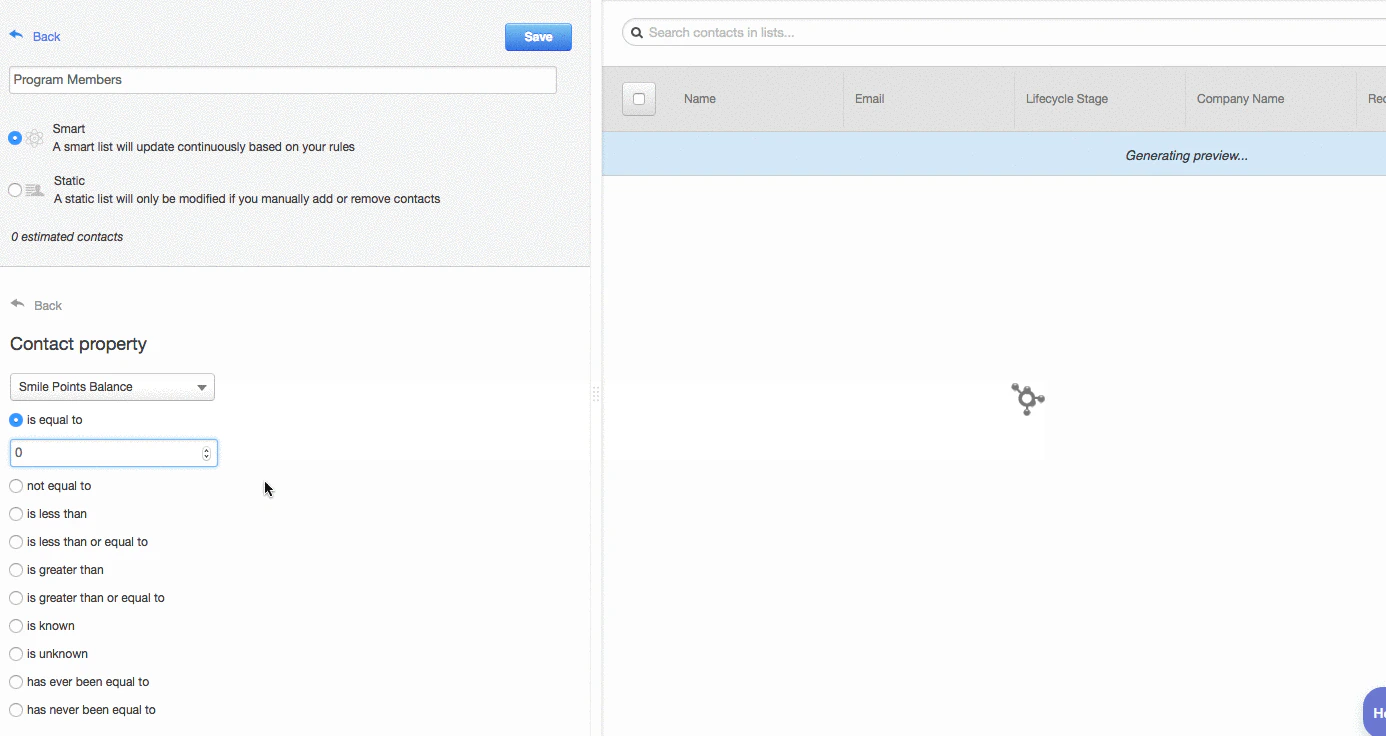
When you are creating a new list in HubSpot, give your list a name so that you can easily identify this specific group of customers.
**Tip:** Choose the Smart list option so that your list will update continuously based on your program's rules.
Select the **Contact Property** option and search for the Smile property you would like to use for your list. If you would like a list of all your program members who have points, search for **Smile Points Balance.** If you want to know how many customers are in a specific VIP tier, search for **Smile VIP Tier Name.**
When you've found the Smile property you'd like to use, select **is greater than or equal to** and enter **1.** This will generate a list of customers that have 1 or more points in your rewards program.
When you're happy with your list, click **Done** and **Save** to have HubSpot start processing your list.
## Filtering contacts
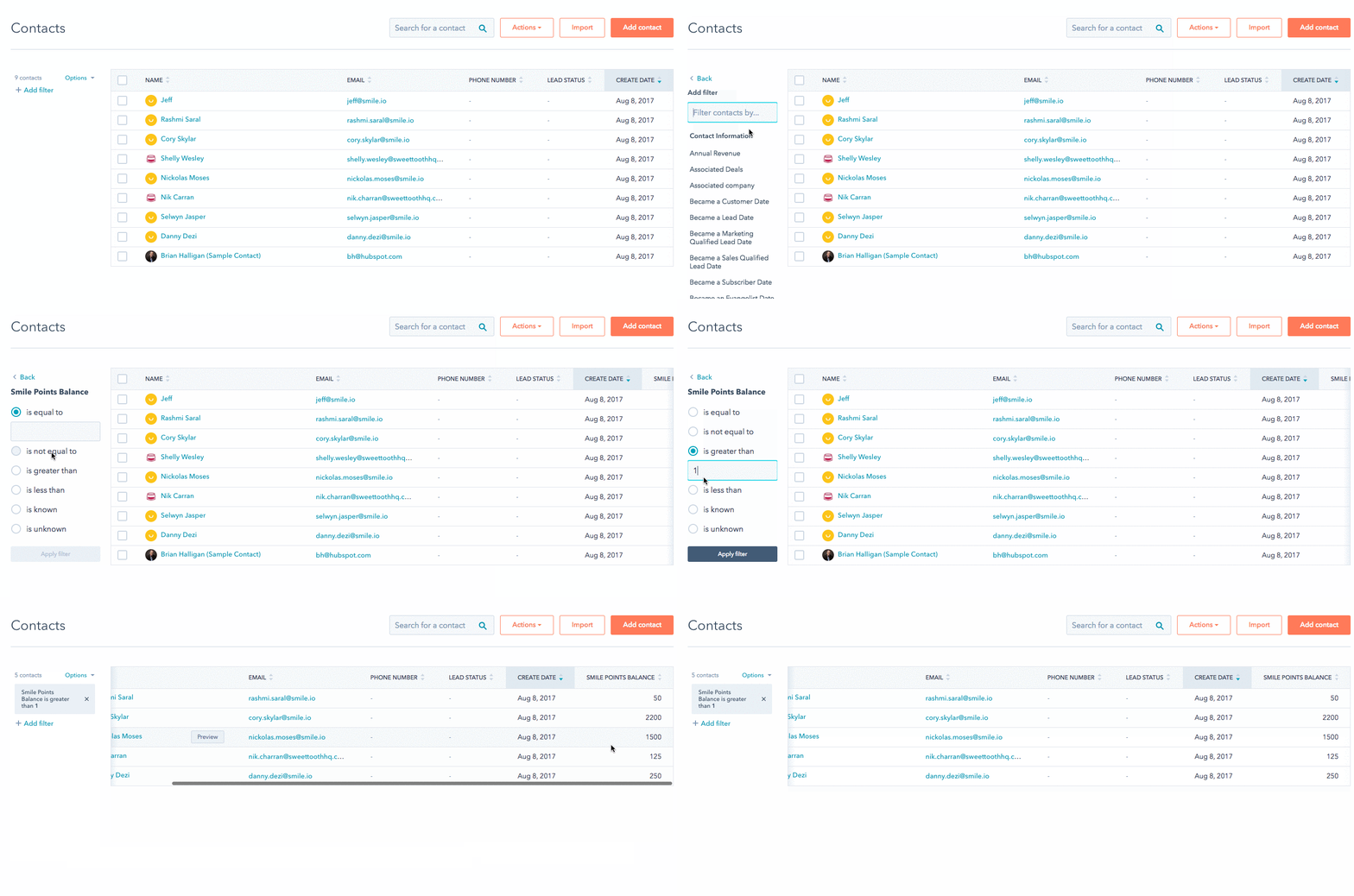
When you are managing your customers in HubSpot, you have the option to filter your contacts by program member information.
1. On the **Contacts** page of your HubSpot Admin, click the **"Add filter"** link found on the left-hand side.
2. In the filter list, search for **Smile** to bring up the different ways you can filter your contacts according to your program's data.
3. Select the rewards data you would like to filter your list by and fill in the necessary fields.
4. Click **Apply Filter** to view all contacts who fit the prescribed criteria.
**Note:** you must be on HubSpot's **Basic**, **Pro,** or **Enterprise** plan to create a list.
When you are creating a new list in HubSpot, give your list a name so that you can easily identify this specific group of customers.
**Tip:** Choose the Smart list option so that your list will update continuously based on your program's rules.
Select the **Contact Property** option and search for the Smile property you would like to use for your list. If you would like a list of all your program members who have points, search for **Smile Points Balance.** If you want to know how many customers are in a specific VIP tier, search for **Smile VIP Tier Name.**
When you've found the Smile property you'd like to use, select **is greater than or equal to** and enter **1.** This will generate a list of customers that have 1 or more points in your rewards program.
When you're happy with your list, click **Done** and **Save** to have HubSpot start processing your list.
## Filtering contacts
When you are managing your customers in HubSpot, you have the option to filter your contacts by program member information.
1. On the **Contacts** page of your HubSpot Admin, click the **"Add filter"** link found on the left-hand side.
2. In the filter list, search for **Smile** to bring up the different ways you can filter your contacts according to your program's data.
3. Select the rewards data you would like to filter your list by and fill in the necessary fields.
4. Click **Apply Filter** to view all contacts who fit the prescribed criteria.