

What’s changing
Two versions of the Smile and Attentive integration exist: the old integration and the new integration. The old integration is being phased out in favour of a new integration with enhanced functionality, syncing speed, security, and other usability benefits.How to migrate
Migrating from the old integration to the new integration is easy and involves only a few steps:1. Install the new integration
In Smile Admin, install the new Attentive integration. Follow the prompts to authorize the connection between your Smile and Attentive accounts.2. Turn on integration features
The new integration has two features that must be individually turned on once the integration is installed. To turn them on, visit the integration settings page in Smile Admin and follow the instructions below.- For the Customer sync feature, click Turn on.
- For the Loyalty events feature, click Turn on.
The Customer sync feature performs an initial sync of all your customers, so it may take some time to complete if you have a large number of customers. Do not proceed to the next step of the migration until the initial sync of all your customers has finished.
3. Update journeys and segments
The old integration syncs both asmileVipTierId and smileVipTierName field, while the new integration syncs only a smileVipTierName field. As such, you’ll need to review any journeys or segments you’ve created in Attentive to ensure they only rely on smileVipTierName.
For each of your loyalty journeys in Attentive:
- Look for any branching steps that use
smileVipTierIdand update them to usesmileVipTierNameinstead - Check for any email or SMS messages that display a customer’s
smileVipTierIdas part of the body or text, and update them to usesmileVipTierNameinstead
- Look for any conditions that use
smileVipTierIdand update them to usesmileVipTierNameinstead
4. Uninstall the old integration
Once all of your journeys and segments have been updated, it’s safe to uninstall the old integration.- In Attentive, open the App marketplace.
- Click on the Installed by you tab.
- Click the
Smile.iointegration. Don’t clickSmile: Loyalty & Rewards. - Click into the Settings tab, and in the Secret Key field, click Show.
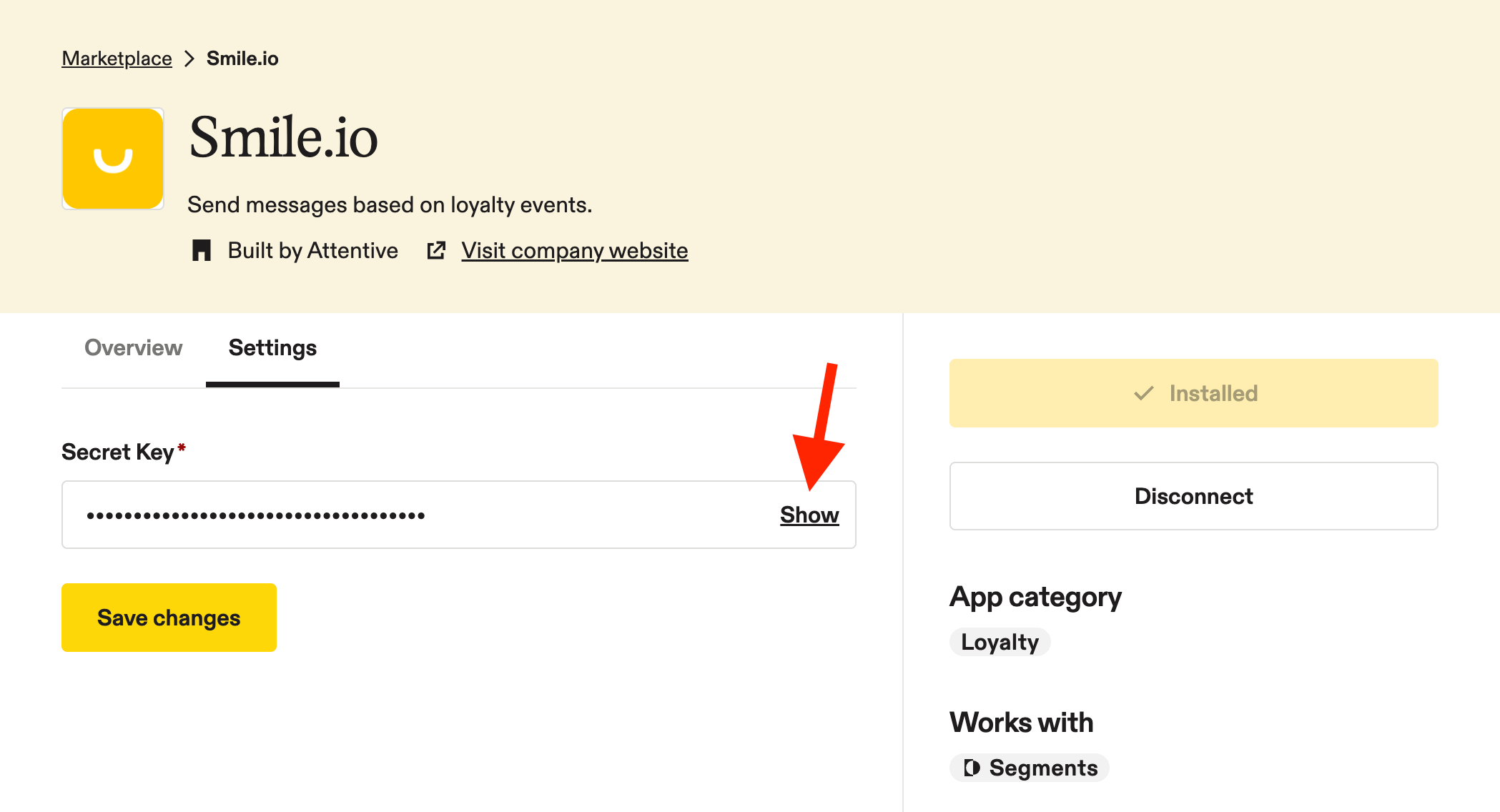
- Write down the last 4 characters of the Secret Key, since you’ll need it in the next step.
- Click Disconnect to uninstall the integration.
5. Delete API key
The old integration uses a Smile API key to connect with Attentive, and once the old integration has been uninstalled, you can safely delete the API key it was using.- In Smile Admin, go to Settings > Developer Tools.
- In the Manage API keys card, look for a row labelled “Attentive” (or similar).
- Confirm that the last 4 characters of the Secret Key from Attentive match the last 4 characters of the API key in Smile.
- Click the trash can icon to delete the API key.
FAQ
Will migrating break my existing journeys or segments?
Will migrating break my existing journeys or segments?
No. The new integration uses the same field names as the old integration, such as
smilePointsBalance and smileVipTierName. Your journeys, segments, and messages keep working without any changes.The only exception is smileVipTierId. The new integration doesn’t sync this field, so update anything that uses it before you uninstall the old integration. Refer to step 3 for instructions.Is it safe to have both integrations installed at the same time?
Is it safe to have both integrations installed at the same time?
Yes. Both integrations write the same values to the same fields on each customer’s Attentive profile, so they don’t conflict. The only difference is that the new integration updates the fields right away, while the old integration updates them once a day.Keeping both installed for a short time lets you switch over without any gap in your data. Once you’ve finished the migration steps, uninstall the old integration.
Will my customers get duplicate messages while both integrations are installed?
Will my customers get duplicate messages while both integrations are installed?
No. Both integrations update the same fields, so each customer still has only one points balance, one VIP tier, and one referral URL in Attentive.The old integration doesn’t send loyalty events, so any journey that starts from a loyalty event only runs once, from the new integration.
Do I need to rebuild my journeys or segments?
Do I need to rebuild my journeys or segments?
No. Your existing journeys and segments keep working with the new integration. You only need to update any that use
smileVipTierId.The new integration also sends loyalty events, such as Smile Points Redeemed and Smile VIP Tier Achieved. You can use these to build new journeys whenever you’re ready. Refer to Attentive data syncing for the full list.Will I lose any customer data?
Will I lose any customer data?
No. Your customers’ loyalty data stays in Smile, and the existing values on their Attentive profiles stay in place. When you turn on Customer sync, the new integration sends the latest values for all your customers.
How long does the migration take?
How long does the migration take?
Most of the steps take only a few minutes. The longest step is the first sync of your customers after you turn on Customer sync. If you have a lot of customers, this can take some time. Your data keeps syncing through the old integration while you wait.
What happens if I forget to update a journey that uses smileVipTierId?
What happens if I forget to update a journey that uses smileVipTierId?
After you uninstall the old integration,
smileVipTierId stops updating in Attentive. Any journey, segment, or message that uses it will then use old VIP tier data. To fix this, update it to use smileVipTierName instead.How do I tell the two integrations apart in Attentive?
How do I tell the two integrations apart in Attentive?
In the Attentive app marketplace, the old integration is called
Smile.io and the new integration is called Smile: Loyalty & Rewards.What happens if I don't migrate?
What happens if I don't migrate?
The old integration is being phased out and won’t get any new features. To keep your loyalty data syncing to Attentive, migrate to the new integration as soon as possible.
Does the new integration cost extra?
Does the new integration cost extra?
No. In fact, the old integration required API access (which was only available on the Smile Plus and Enterprise plans), while the new integration is available on any paid Smile plan.
What if something doesn't look right after I migrate?
What if something doesn't look right after I migrate?
If you haven’t uninstalled the old integration yet, keep it installed. Then contact Smile support and we’ll help you sort it out.