

Feature availability: Show points at checkout is available on Growth, Plus, and Enterprise plans for merchants on Shopify Plus.
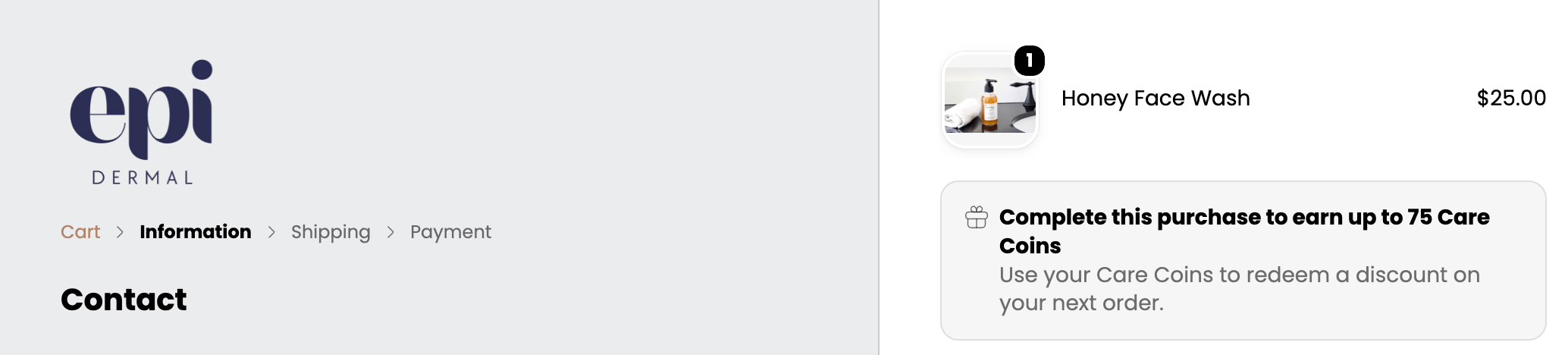
Add points to the checkout extension
- From Smile Admin, navigate to On-site content.
- In the Show points at checkout section, click Setup.
- In the Quick setup section, click Go to checkout settings.
- In the Configurations section, click Customize.
- In the Apps section, search for Smile.
- Choose the Show points customer will earn app block.
- Click Save.
Visibility conditions
- The banner is visible to all program members. Guests can also see the banner when your Program Participants setting includes all customers.
- Customers excluded by tag or customer group will not see the banner when signed in. If they check out as a guest, the banner may still appear.
- If you have multiple Ways to earn active, the extension always displays points based on the lowest-value rule to set clear customer expectations.
- Excluded products are not currently factored into the calculation.
- Shipping, taxes, and discounts are not currently factored into the points calculation.